How to Create Cinematic Videos With AI (A Creator's Guide)
To create cinematic videos with AI, describe the shot like a cinematographer would. Specify the camera angle, camera movement, lens, lighting, depth of field and color grade.
 By Yasiru Withanage15 min readUpdated 25 October 2026
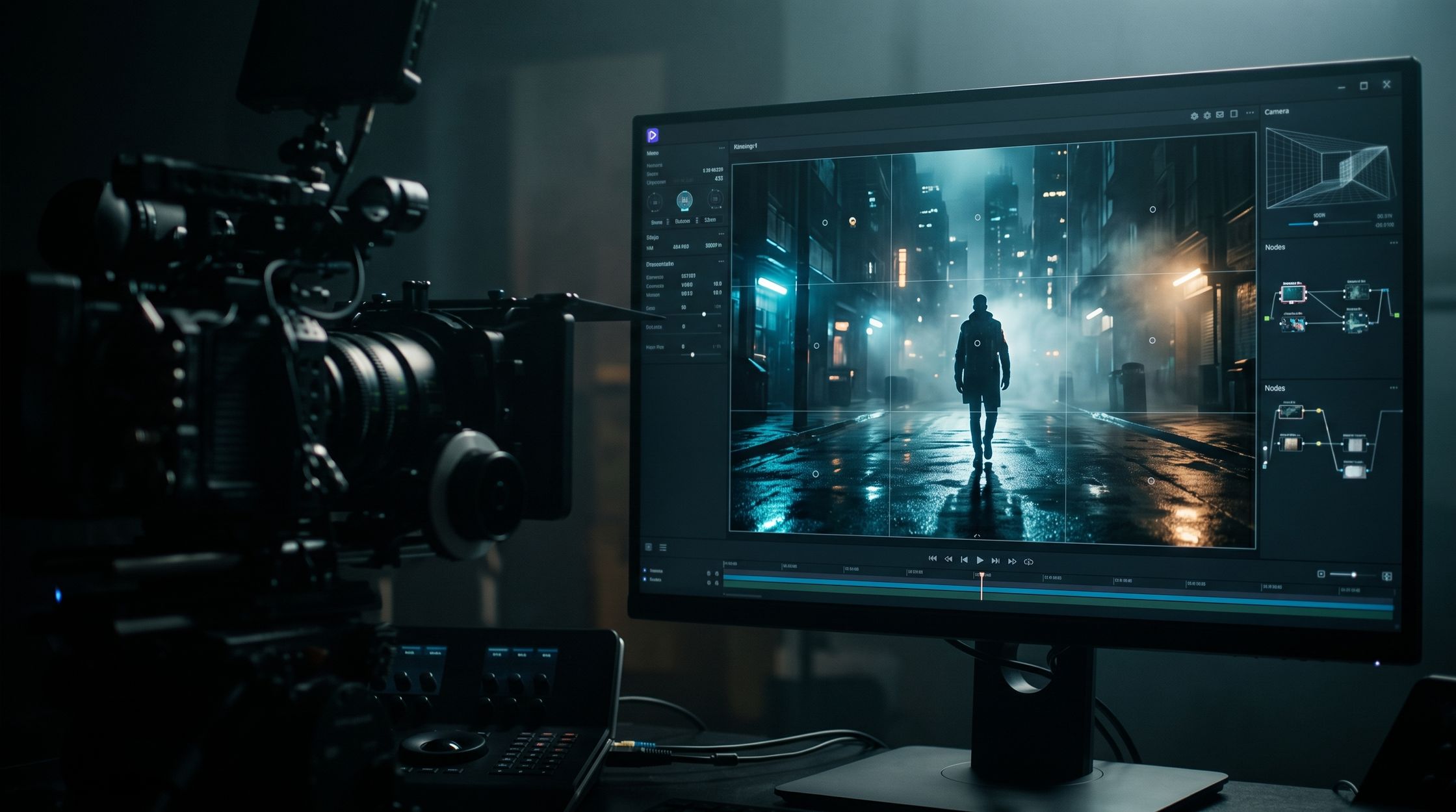
You've seen them. The AI clips that make you stop scrolling. A lone figure on a rain-soaked street, neon bleeding into puddles, the camera drifting slowly forward. It feels like a frame from a film you'd pay to watch.
Then you try it yourself. You type "a man walking in the rain, cinematic" and get something that looks like a stock video from 2014.
Here's the secret: "cinematic" isn't a style you ask for. It's a set of decisions you describe. Directors and cinematographers make dozens of choices about framing, angle, light, lens and color before a single frame is shot. AI video models like Veo 3.1, Kling and Runway respond to those same choices. You just have to speak their language.
This guide walks you through every one of those decisions, gives you copy-ready prompts, and shows how to turn single shots into a consistent, film-like sequence.
What Makes a Video Look Cinematic?
A video looks cinematic when every visual choice feels intentional. Nothing is accidental. The frame, the light and the movement all serve the story or the mood.
Compare a phone video of your friend at a café with the café scene in a film. Same subject. Totally different feeling. The film version has:
- A deliberate frame. The subject sits off-center, with space around them that means something.
- Motivated light. Light comes from a window or a lamp, shaping the face instead of flattening it.
- Controlled focus. The background melts into soft blur, so your eye goes exactly where the director wants.
- Purposeful motion. The camera moves slowly, or not at all, and never wanders.
- A color mood. Warm and nostalgic, or cold and lonely. The palette tells you how to feel.
- A wider aspect ratio. 2.39:1 letterboxing instantly says "movie" to most viewers.
Think of these as six dials. Generic AI clips leave every dial on "auto." Cinematic AI clips set each one on purpose.
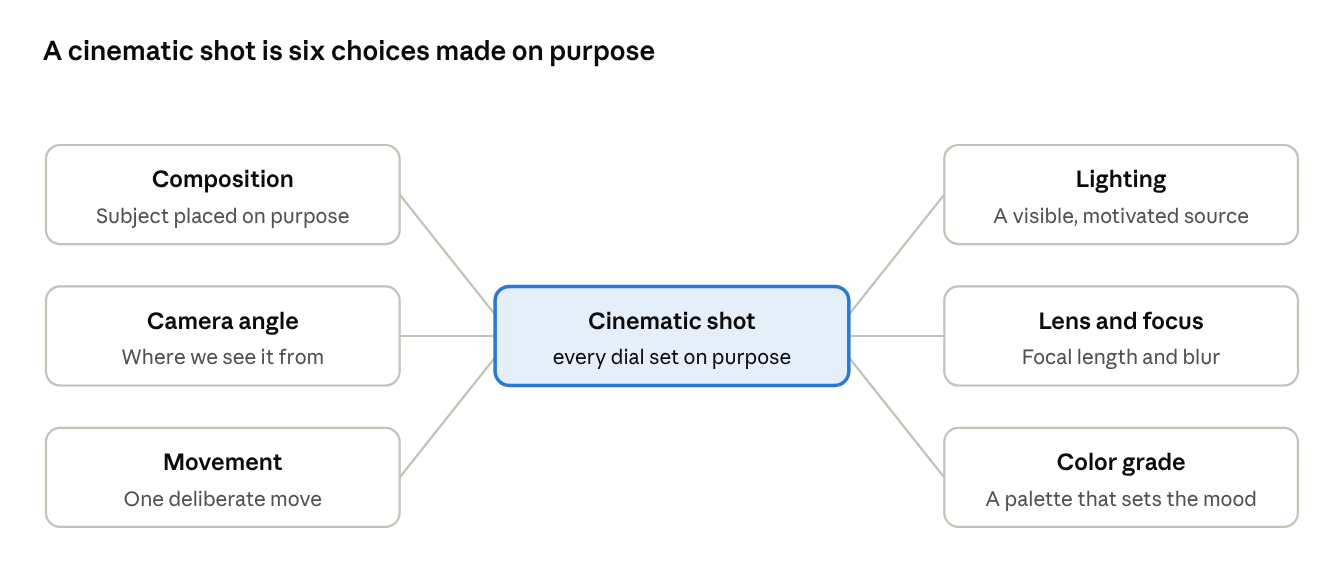
Every section below covers one of these dials, with the exact words to use in your prompts.
Cinematic Composition: Where Things Sit in the Frame
Composition is the arrangement of everything inside the frame. It's the first thing a viewer feels, even if they never notice it.
AI models default to dead-center framing. That's why so many AI clips feel flat. You fix it by telling the model exactly where the subject lives.
Rule of thirds. Split the frame into a 3×3 grid. Place your subject on one of the lines or where two lines cross. Leave the open space on the side the subject is looking toward.
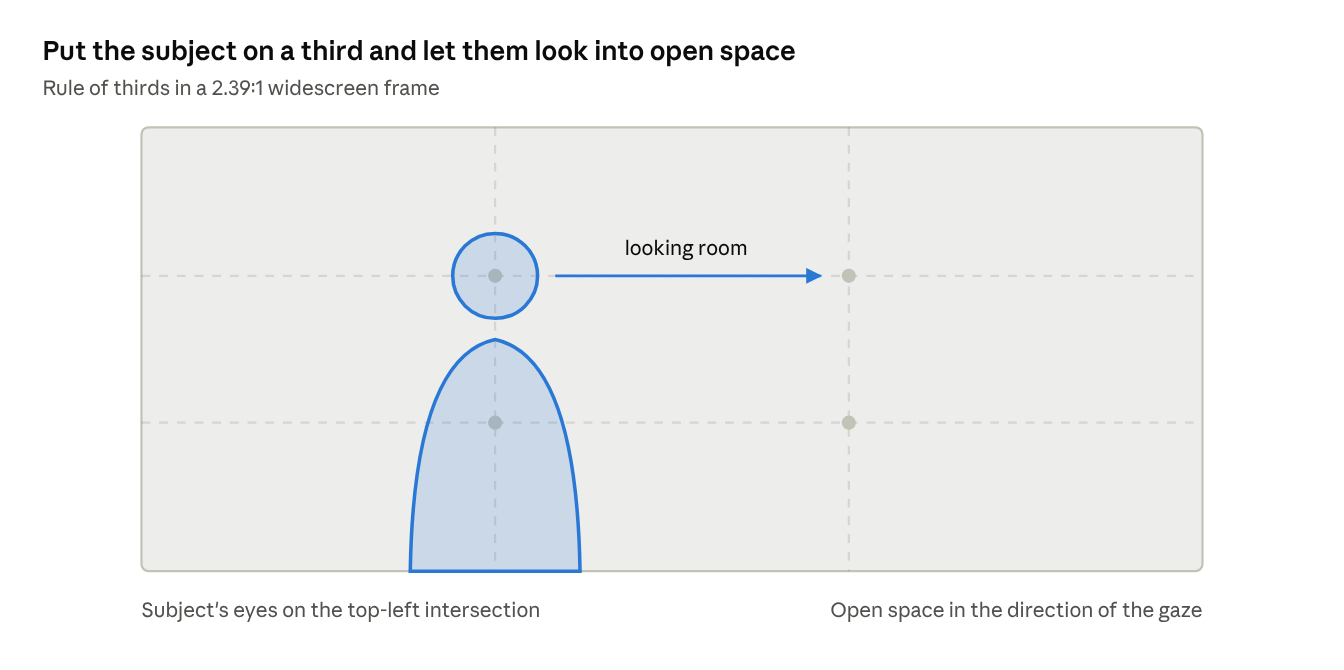
In a prompt, this becomes: "subject framed on the left third, looking right into open space, 2.39:1 widescreen."
Leading lines. Roads, railway tracks, corridors and fences pull the eye toward the subject. Prompt them in: "a long hallway leading to a figure at the far end."
Negative space. A tiny figure in a vast desert feels lonely. A face filling the frame feels intense. Empty space is an emotion.
Frame within a frame. Shoot through a doorway, a car window or tree branches. It adds depth and a voyeuristic feel.
Symmetry. Perfectly centered compositions feel controlled, eerie or grand. Think Wes Anderson hallways or Kubrick corridors. Use center framing on purpose, not by default.
Prompt phrases that work:
- "subject framed on the left third, looking right into open space"
- "symmetrical composition, centered one-point perspective"
- "silhouette against the horizon, vast negative space"
- "shot through a rain-streaked window, foreground blur"
Camera Angles and the Emotions They Create
The camera angle decides how the audience sees your subject. Look up at someone and they feel powerful. Look down and they feel small. Same character, opposite story.
Here's a cheat sheet you can keep open while prompting:
| Angle | What it makes the viewer feel | Use it for | Prompt keywords |
|---|---|---|---|
| Eye level | Neutral, honest, relatable | Dialogue, everyday moments | "eye-level shot" |
| Low angle | Power, heroism, threat | Heroes, villains, giant structures | "low-angle shot looking up" |
| High angle | Vulnerability, isolation | A character at their lowest | "high-angle shot looking down" |
| Bird's-eye / overhead | Detachment, scale, pattern | Cities, crowds, tabletop scenes | "top-down overhead shot" |
| Worm's-eye | Extreme scale, awe | Towers, monsters, forests | "extreme low angle from the ground" |
| Dutch angle | Unease, chaos, madness | Thrillers, dream sequences | "Dutch angle, tilted frame" |
| Over-the-shoulder | Connection, conversation | Two-person scenes | "over-the-shoulder shot" |
| POV | Immersion, first-person tension | Horror, action, discovery | "first-person POV shot" |
Camera angles, the feeling they create and the prompt keywords to use
Shot size matters too. Pair the angle with how much of the subject you see: extreme wide shot, wide shot, medium shot, close-up or extreme close-up. "Low-angle medium shot" is far more useful to an AI model than "cool angle."
Camera Movements That Make AI Video Feel Alive
Movement is where AI video really shines, and where most prompts fall apart. If you don't specify a move, the model invents one. Usually a random, floaty drift.
One rule first: one clear movement per shot. Asking for a dolly, a pan and a crane in five seconds confuses the model and the viewer.
| Movement | What the camera does | Feeling | Prompt language |
|---|---|---|---|
| Static / locked-off | Doesn't move at all | Calm, observational, tense | "static shot, locked-off tripod" |
| Slow push-in (dolly in) | Glides toward the subject | Growing tension or realization | "slow dolly push-in toward her face" |
| Pull-out (dolly out) | Glides away | Reveal, loneliness, ending | "slow dolly out revealing the empty room" |
| Tracking shot | Moves alongside the subject | Energy, following a journey | "tracking shot following him from the side" |
| Pan | Rotates left or right on one spot | Scanning, revealing a space | "slow pan left across the skyline" |
| Tilt | Rotates up or down | Revealing height or scale | "tilt up from boots to face" |
| Crane / jib | Rises or descends smoothly | Epic opening or finale | "crane shot rising above the crowd" |
| Orbit / arc | Circles around the subject | Drama, heroic moments | "360-degree orbit around the dancer" |
| Handheld | Slight natural shake | Realism, urgency, documentary | "handheld camera, subtle shake" |
| FPV drone | Fast, sweeping flight | Adrenaline, spectacle | "FPV drone diving down the cliff face" |
Camera movements, what the camera does, the feeling and the prompt language
Speed words change everything. "Slow," "gentle" and "gradual" make a shot feel expensive. "Whip," "rapid" and "snap" make it feel energetic. When in doubt, go slow. Slow reads as cinematic.
Lighting: The Fastest Way to Look Expensive
If you only improve one thing in your prompts, make it lighting. Flat, even light is the number one giveaway of amateur video. Cinematic light has direction, contrast and a source.
Name the light source. Don't say "good lighting." Say where the light comes from: a window, a streetlamp, a campfire, a TV screen, the setting sun. Cinematographers call this motivated lighting, and AI models handle it beautifully.
Here are the lighting setups worth memorizing:
- Golden hour. Low, warm sun just after sunrise or before sunset. Long shadows, glowing skin. Instantly romantic and nostalgic.
- Blue hour. The cool, soft twilight after sunset. Moody and quiet. Perfect for city scenes with lights coming on.
- Rembrandt lighting. One strong light from the side, leaving a small triangle of light on the shadowed cheek. Classic portrait drama.
- Rim light / backlight. Light behind the subject outlines their hair and shoulders. Separates them from a dark background.
- Chiaroscuro / low-key. Deep blacks, strong contrast, small pools of light. Noir, thrillers and crime dramas live here.
- High-key. Bright, soft, few shadows. Commercials, comedies and dreamy scenes.
- Practical lights. Visible lamps, neon signs and candles inside the shot. They make a scene feel real and lived-in.
- Volumetric light. Visible beams cutting through fog, dust or smoke. AI models love this, and so do viewers.
Example: "Low-key lighting, single warm tungsten lamp on the desk as the only source, deep shadows across the room, faint blue moonlight through the window."
Depth of Field: Telling the Viewer Where to Look
Depth of field is how much of the image is sharp. It's one of the biggest reasons film looks different from phone footage.
Shallow depth of field keeps only the subject sharp and dissolves everything else into soft blur. It feels intimate and premium. It's the default "cinematic" look for portraits, product shots and emotional moments.
Deep depth of field keeps everything sharp from front to back. It suits landscapes, busy city scenes and shots where the environment is part of the story.
Bokeh is the quality of that blur. Out-of-focus city lights turning into soft circles is bokeh, and it's pure eye candy.
Rack focus shifts focus from one subject to another mid-shot. It redirects attention like a plot twist: from a ringing phone in the foreground to the person staring at it.
Prompt phrases that work:
- "shallow depth of field, f/1.4, creamy bokeh background"
- "background lights blurred into soft circular bokeh"
- "deep focus, everything sharp from foreground to horizon"
- "rack focus from the coffee cup to the woman behind it"
Aperture numbers like f/1.4 or f/2.8 are understood by most video models. Lower numbers mean blurrier backgrounds.
Color Grading: Setting the Mood in One Line
Color grading is how a film's colors are pushed and shaped after shooting. In AI video, you get to describe the grade upfront, which is honestly a superpower.
Pick a palette that matches the emotion, then name it clearly:
| Grade / look | Mood | Works for | Prompt keywords |
|---|---|---|---|
| Teal and orange | Blockbuster, energetic | Action, travel, adventure | "teal and orange color grade" |
| Warm golden | Nostalgic, romantic | Memories, love stories | "warm golden tones, soft highlights" |
| Cold blue / desaturated | Lonely, tense, clinical | Thrillers, sci-fi, winter | "cold blue desaturated grade" |
| Bleach bypass | Gritty, harsh | War, crime, survival | "bleach bypass look, high contrast, muted colors" |
| Neon noir | Electric, mysterious | Cyberpunk, night cities | "neon pink and cyan, deep blacks" |
| Pastel | Whimsical, playful | Comedy, fashion, Wes Anderson style | "soft pastel palette, symmetrical" |
| Black and white | Timeless, serious | Drama, flashbacks | "high-contrast black and white" |
Color grades, the mood they set and the prompt keywords to use
Film stocks are a cheat code. Naming a film stock gives the model a whole package of color, contrast and grain. Try "shot on Kodak Portra 400" for warm, soft skin tones, "Kodak Vision3 500T" for moody night scenes, or "Fujifilm Eterna" for muted, gentle color.
Add "subtle 35mm film grain" to almost any prompt. It's a tiny phrase that removes the plastic, too-clean AI look.
Lens Choices: Why 24mm and 85mm Feel So Different
The lens changes how space looks. A wide lens stretches distance and pulls you into the scene. A long lens squeezes the background and isolates the subject. AI video models have learned these differences from millions of real shots, so naming a focal length works surprisingly well.
| Lens | Look | Best for |
|---|---|---|
| 14–18mm ultra-wide | Exaggerated depth, slight distortion | Epic landscapes, tight interiors, action |
| 24mm wide | Immersive, shows the environment | Establishing shots, walking scenes |
| 35mm | Natural, documentary feel | Storytelling, street scenes, most dialogue |
| 50mm | Close to human eye | Medium shots, honest portraits |
| 85mm | Flattering, background compressed | Close-ups, beauty, emotional moments |
| 135mm+ telephoto | Very compressed, isolated subject | Surveillance feel, sports, distant action |
| Macro | Tiny details, huge on screen | Products, insects, food, textures |
| Anamorphic | Wide 2.39:1, oval bokeh, horizontal flares | That unmistakable Hollywood look |
Lenses, the look they give and what they are best for
Anamorphic deserves its own mention. Adding "anamorphic lens, horizontal lens flare, oval bokeh" is one of the quickest ways to make a clip read as a movie. Use it for night scenes with streetlights or headlights and watch the flares stretch across the frame.
Example: "85mm portrait lens, close-up of an old fisherman's weathered face, shallow depth of field, harbor lights as soft bokeh behind him."
How to Write Film-Style Prompts
Now let's put it together. A film-style prompt reads like a line from a cinematographer's shot list, not like a wish. The best ones follow the same order every time:
Shot + Subject + Action + Setting + Camera Move + Lens + Lighting + Color + Mood
That order mirrors how directors think: first what we see, then how the camera sees it, then how it feels.
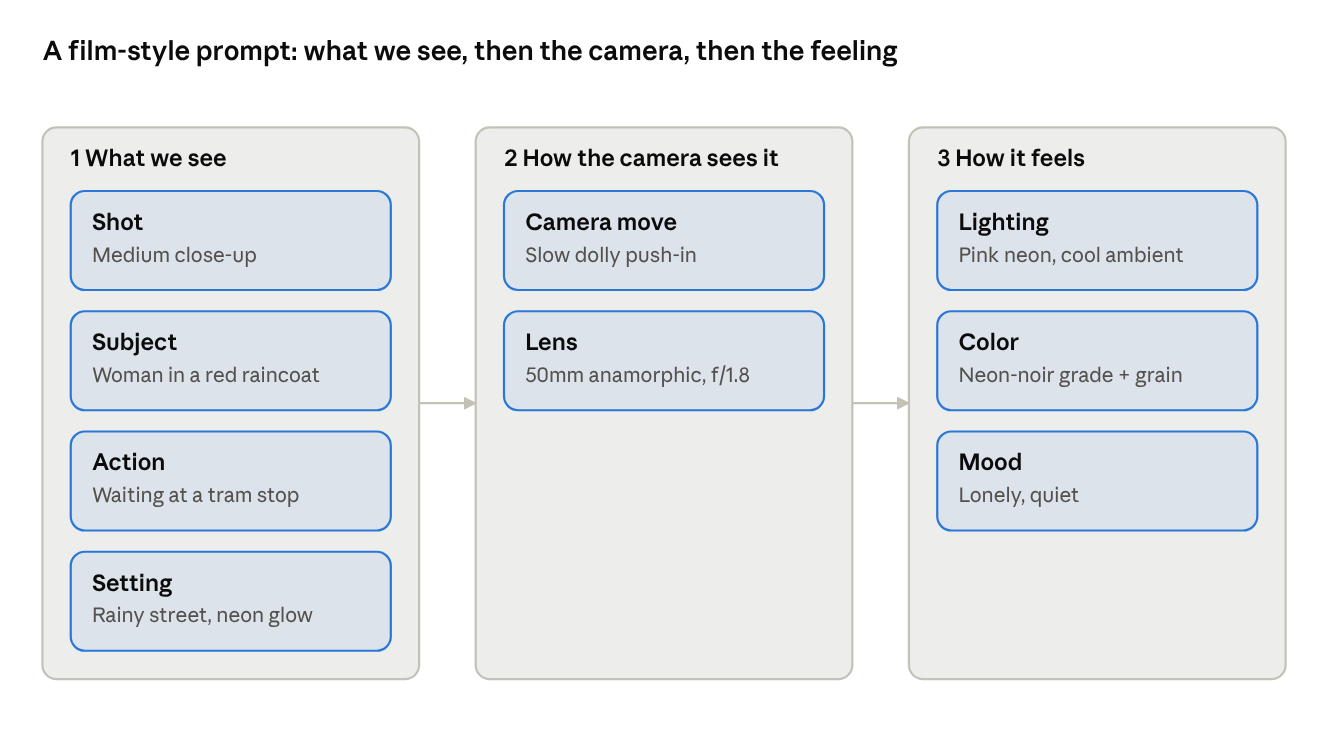
Fill each box in order and you have a complete, film-style prompt.
Here's the difference in practice.
Before: "A woman in a city at night, cinematic, 4K."
After: "Medium close-up of a woman in a red raincoat waiting at a tram stop, rain falling, neon signs reflecting in puddles. Slow dolly push-in. 50mm anamorphic lens, shallow depth of field, oval bokeh. Lit by a flickering pink neon sign, cool blue ambient light. Teal and magenta neon-noir grade, subtle film grain. Lonely, quiet mood."
The first prompt leaves every decision to chance. The second one directs the shot.
A few writing habits that help:
- Be concrete. "Red raincoat" beats "stylish outfit." Specific details make specific images.
- Skip empty hype words. "Masterpiece," "ultra-realistic" and "8K" add little. Camera and light language does the heavy lifting.
- One idea per shot. A five to eight-second clip can hold one action and one movement. Save the rest for the next shot.
- Describe sound when the model supports it. Veo 3.1 can generate audio, so "distant thunder, rain tapping on the shelter roof" adds atmosphere.
8 Cinematic AI Video Prompts You Can Copy Today
Steal these, swap the subject, and keep the camera language. Each one works as a starting point in Veo 3.1, Kling or Runway.
1. Epic landscape opener
Extreme wide shot of a lone hiker standing on a jagged mountain ridge at sunrise, sea of clouds below. Slow crane shot rising up and back to reveal the vast range. 24mm wide lens, deep focus. Golden hour backlight, rim light on the hiker, volumetric light through mist. Warm amber and soft blue grade, subtle film grain. Awe-inspiring, peaceful.
2. Neon-noir night street
Medium shot of a man in a long dark coat lighting a cigarette under a flickering streetlamp, rain-soaked alley, steam rising from a grate. Static locked-off shot. 35mm anamorphic lens, horizontal lens flares, oval bokeh. Low-key lighting, pink and cyan neon from shop signs. Neon-noir grade, deep blacks, film grain. Tense, mysterious.
3. Emotional close-up
Extreme close-up of an elderly woman's eyes filling with tears as she reads a letter, soft window light from the left. Very slow push-in. 85mm lens, f/1.4, shallow depth of field. Rembrandt lighting, warm tungsten tones. Gentle golden grade, Kodak Portra 400 look. Intimate, bittersweet.
4. Action chase
Low-angle tracking shot following a motorcycle racing through a desert canyon, dust trailing behind. Camera moves fast alongside the bike. 24mm lens, motion blur on the ground. Harsh midday sun, hard shadows. Teal and orange blockbuster grade, high contrast. Adrenaline, high energy.
5. Sci-fi reveal
Wide shot of an astronaut stepping out of a crashed pod onto a frozen alien planet, two moons in a violet sky. Slow dolly out revealing the endless ice field. 18mm ultra-wide lens. Cold blue ambient light, faint rim light from the moons. Desaturated cold grade, light haze. Isolated, otherworldly.
6. Cozy café scene
Medium close-up of a barista pouring latte art in a small wooden café, morning light through steamy windows. Slow arc around the counter. 50mm lens, shallow depth of field, warm bokeh from hanging bulbs. Soft natural window light with warm practical lights. Warm golden grade, gentle film grain. Calm, inviting.
7. Luxury product shot
Macro close-up of a perfume bottle on black marble, droplets of water sliding down the glass. Slow 180-degree orbit. Macro lens, extremely shallow depth of field. Single hard key light from above, sharp rim light outlining the bottle. Deep blacks, gold highlights, high contrast. Elegant, premium.
8. Horror tension
POV shot slowly walking down a dark hospital corridor, one flickering fluorescent light at the far end, a door creaking open. Handheld camera, subtle shake. 24mm lens. Low-key lighting, sickly green fluorescent cast. Desaturated cold grade, heavy film grain. Dread, suspense.
Creating Multiple Cinematic Shots (Not Just One Pretty Clip)
A single beautiful clip is a GIF. A sequence of shots is a film. The magic of cinema happens in the cut between shots, and that's where most AI creators stop too early.
Filmmakers use a simple pattern called coverage: show the world, then the person, then the detail, then the reaction. It's been working for a hundred years.
- Establishing shot. A wide shot that tells us where we are. The rainy city skyline at night.
- Wide or full shot. Our character in that world. She steps off the tram onto the empty street.
- Medium shot. Body language and action. She checks her phone, frowning.
- Close-up. Emotion. Her face, lit by the phone screen.
- Insert shot. A meaningful detail. The message on the screen: "Don't come."
- Reaction or exit. The beat that lands it. She looks up. Slow dolly out as she stands alone.
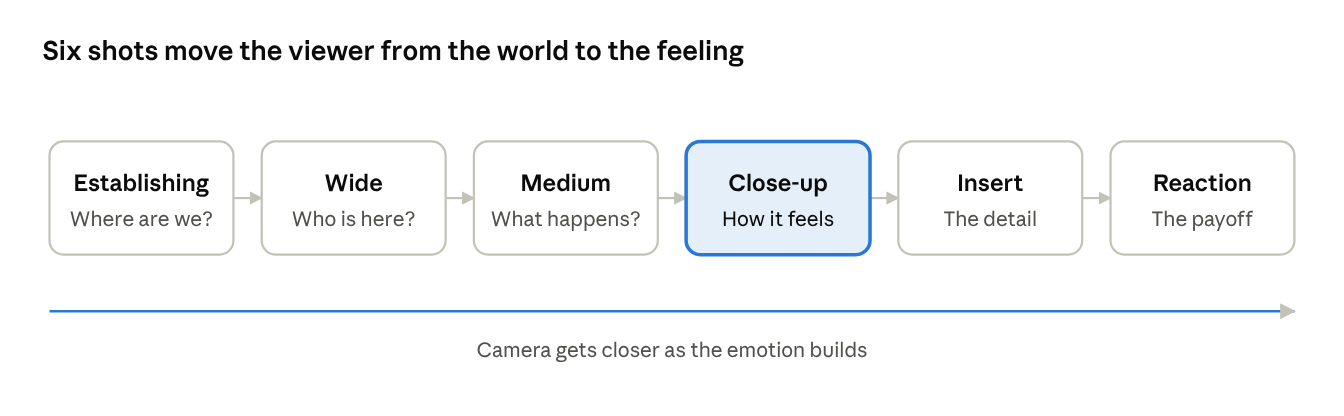
Six prompts. One tiny story. That's the difference between "cool AI video" and "wait, who made this?"
Tips for sequences:
- Vary shot sizes. Cutting from wide to wide feels jumpy. Wide to medium to close-up feels smooth.
- Alternate movement and stillness. A slow push-in followed by a static shot gives the edit rhythm.
- Keep screen direction. If she walks left to right in shot 2, keep her moving left to right in shot 3. Flipping it confuses viewers.
- Plan the edit first. Write your shot list before generating anything. It saves credits and time.
Maintaining Visual Consistency Across Shots
Consistency is the hardest part of AI filmmaking. Your heroine has brown hair in shot one and auburn hair in shot three. The café changes from wood to marble. The grade drifts from warm to cold. Suddenly it feels like six different videos.
Here's how to keep everything locked together.
- Write a character sheet once, paste it everywhere. Describe your character in one fixed sentence and reuse it word for word in every prompt. "A woman in her early 30s with shoulder-length black hair, a red raincoat and silver hoop earrings." Changing even one word invites the model to reinvent her.
- Lock a "look block." Keep a fixed ending for every prompt in the sequence: lens type, lighting style, color grade, film grain and aspect ratio. Only the shot size, action and camera move should change between shots.
- Use reference images. Most tools now support image-to-video or character references. Generate one strong still of your character and location, then use it as the starting frame or reference for every shot.
- Keep time of day and weather constant. If shot one is rainy blue hour, every shot is rainy blue hour. Mixing these is the fastest way to break continuity.
- Stick to one model per sequence. Veo, Kling and Runway each have their own color science and "handwriting." Mixing them in one scene shows.
- Finish with a unifying grade. Apply the same LUT or color correction to every clip in your editor. It smooths out small differences the models leave behind.
The PromptMotion Workflow: From Rough Idea to Cinematic Shot List
Everything in this guide works. It's also a lot to remember every time you open a prompt box. Shot sizes, lenses, lighting setups, grades, character sheets, continuity. That's exactly why we built PromptMotion.
PromptMotion turns a rough idea into structured, cinematic prompts for Veo 3.1, Kling, Runway, MiniMax and Seedance. You bring the idea. It handles the film language.
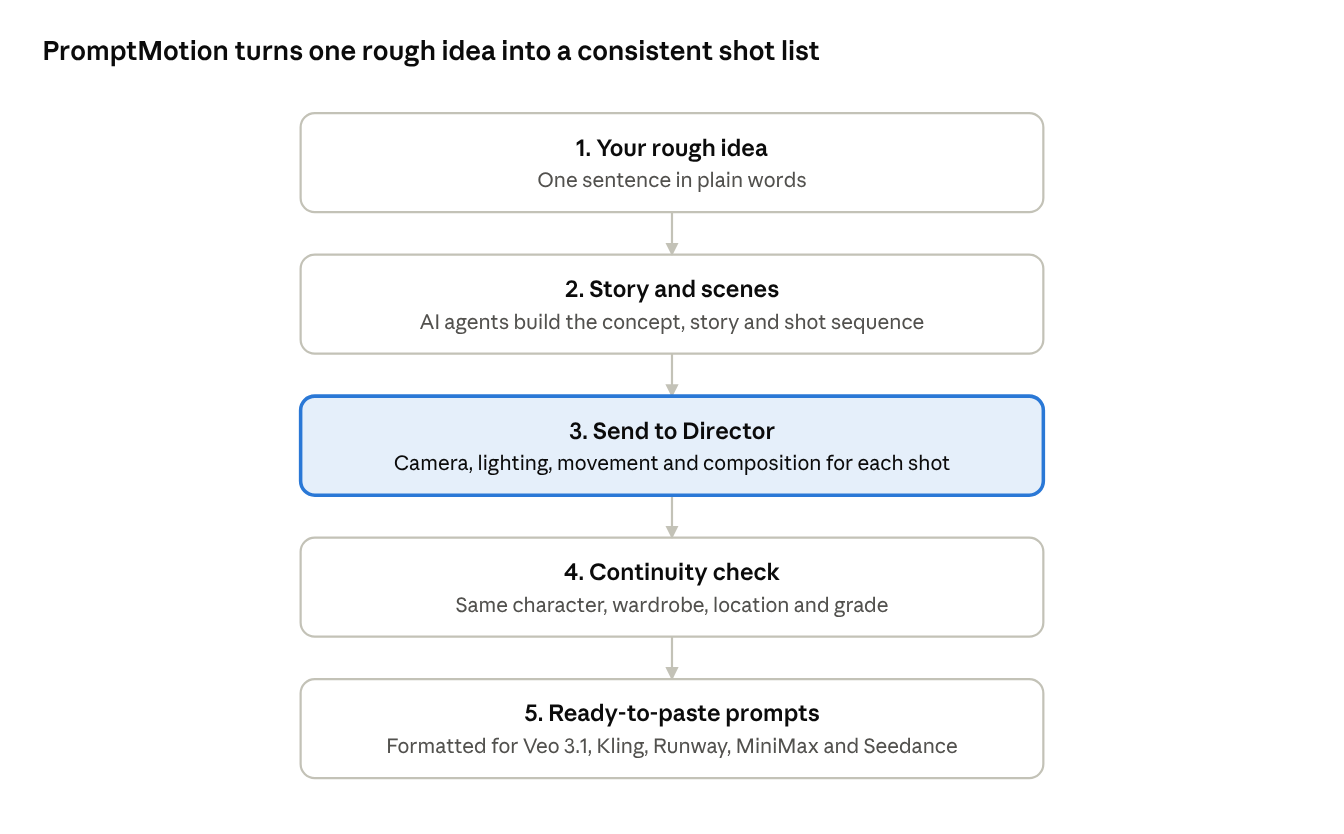
Here's how it works:
- Type your rough idea. Plain words are fine. "A girl waiting for someone at a rainy tram stop who never shows up."
- PromptMotion builds the story. A team of AI agents breaks your idea into a concept, a story structure and individual scenes. You get a proper shot sequence, not one lonely clip.
- Send to Director. Before writing a single prompt, the AI Director plans the camera angle, movement, lighting and composition for each shot, matched to the emotion of that moment.
- Continuity gets checked for you. A built-in continuity checker keeps your character, wardrobe, location, time of day and color grade the same from shot to shot.
- Copy and generate. Each shot comes out as a clean, film-style prompt formatted for your chosen tool. Paste, generate, and cut them together.
What would take you an hour of looking up lens charts and rewriting prompts takes a couple of minutes. And because the cinematography choices come from a knowledge base that maps techniques to emotions, your shots don't just look good. They feel right.
Frequently Asked Questions
What is the best AI tool for cinematic videos? Veo 3.1, Kling and Runway all produce strong cinematic results. Veo 3.1 is great for realism and built-in audio, Kling handles motion and characters well, and Runway gives you strong creative control. The prompt matters more than the tool.
Why do my AI videos look fake? Usually it's flat lighting, centered framing, random camera drift and an over-clean look. Name a light source, place your subject off-center, specify one camera move and add subtle film grain.
Does adding "cinematic" to a prompt work? A little. But it's vague. Describing the angle, lens, lighting and color grade gives you far more control than the word "cinematic" alone.
How long should a cinematic AI prompt be? Around 40 to 80 words is a sweet spot. Long enough to cover shot, subject, camera, lens, light and grade. Short enough that the model doesn't get confused.
How do I keep the same character across AI video clips? Reuse the exact same character description in every prompt, use a reference image, and keep lighting, time of day and grade identical across the sequence.
Final Thoughts: Direct, Don't Describe
Cinematic AI video isn't about finding a magic keyword. It's about thinking like a director. Where is the camera? How does it move? Where does the light come from? What should the audience feel?
Answer those questions in every prompt and your AI videos will stop looking like AI videos. They'll start looking like films.
Want the director's thinking done for you? Start creating cinematic prompts with PromptMotion →

About the author
Yasiru Withanage — Founder | Head of AI & Computer Vision, Calexa Innovations Pvt Ltd
Yasiru Withanage is the Founder and Head of AI & Computer Vision at Calexa Innovations. With 6+ years in AI engineering, he builds production-ready systems across computer vision, generative AI, LLMs, and multi-agent systems. He also developed PromptMotion, an AI creative platform that helps creators turn ideas into cinematic video prompts.
Want prompts like these written for your own brief?
Paste your notes. PromptMotion writes the prompt.
Try it free