The Ultimate Guide to Writing AI Video Prompts
Learn how to write AI video prompts that actually work. A simple 8-part structure, before/after examples, and 10 copy-ready prompts for Veo, Kling, Runway and more.
 By Yasiru Withanage9 min readUpdated 25 October 2026
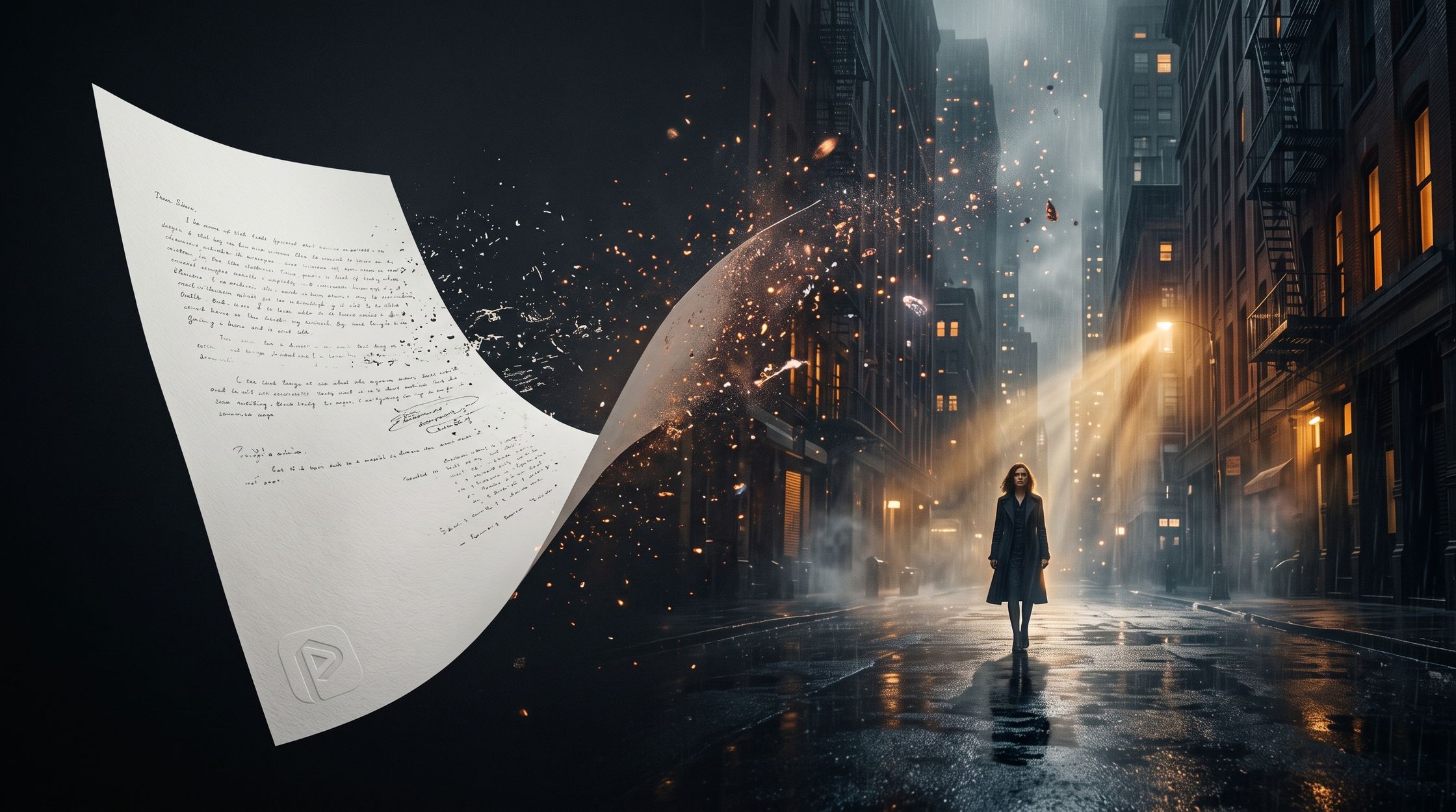
You typed "a woman walking in the city at night." You hit generate. You waited.
And what came back looked like a stock footage clip from 2009. Flat light. A floaty camera that didn't know where it was going. A face that changed halfway through.
Here's the thing nobody tells you: the model didn't fail. Your prompt did. AI video tools like Veo, Kling, Runway, MiniMax and Seedance are shockingly capable, but they only shoot what you describe. Leave the camera out, and the model picks one at random. Leave the lighting out, and you get beige.
This guide is everything we've learned building PromptMotion, a tool that writes structured video prompts for over 1,500 creators. You'll get a simple 8-part structure, a real before-and-after breakdown, and 10 prompts you can copy today.
What makes a good AI video prompt?
A good AI video prompt reads like a shot description a director would hand to a camera crew. It answers the questions the model would otherwise guess at: who, where, doing what, seen how, lit how, and moving how.
Think of it this way. A text-to-image prompt describes a photo. A video prompt describes a photo plus time. Something has to happen, and the camera has to have an opinion about it.
The best prompts we see share five habits:
- They're specific, not long. "A barista in a green apron" beats "a person." But 300 words of adjectives just confuses the model.
- They describe one shot. One subject, one action, one camera move. Most clips are 5 to 10 seconds, so don't cram a whole story in.
- They name the camera. Dolly in, slow orbit, handheld, drone pull-back. This single detail changes the feel more than anything else.
- They set the light. Golden hour, neon, overcast, candlelight. Light is mood.
- They use visual words, not feelings. "She looks sad" is vague. "Tears welling, she glances down at the letter" is something a model can actually render.
If you remember nothing else: describe what the camera sees, not what you feel.
The basic AI video prompt structure
Every strong prompt is built from the same eight blocks. You don't need all of them every time, but each one you skip is a decision you hand to the AI.
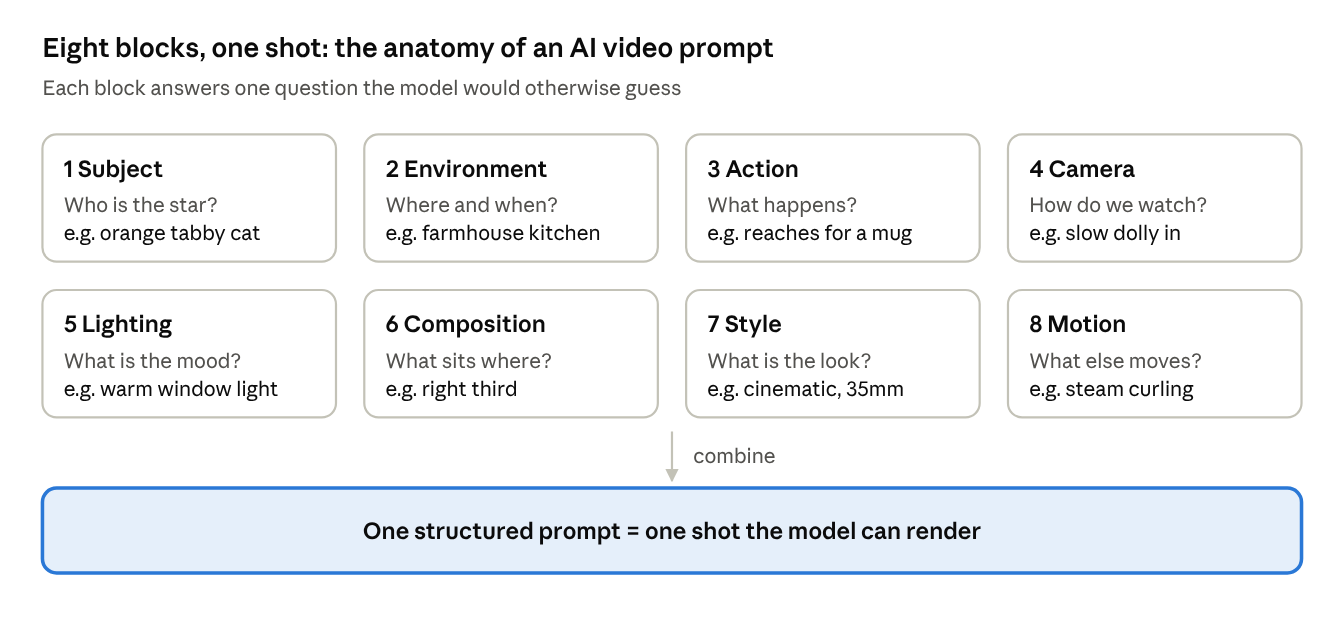
A simple order that works: Subject + Environment + Action, then Camera + Lighting + Composition, then Style + Motion. Write it as two to five plain sentences, not a keyword pile.
Here's the template you can steal:
[Subject] in [Environment], [Action].
[Camera shot and move]. [Lighting].
[Composition]. [Style]. [Motion details].
The 8 building blocks, explained
1. Subject: who or what is the star?
Start here. Be concrete about age, clothing, texture and one or two defining details. Models latch onto distinctive features, which also helps keep a character consistent across clips.
- Weak: a man
- Strong: a weathered fisherman in his 60s, grey beard, yellow raincoat
2. Environment: where are we?
Give the place, the time of day and a bit of atmosphere. Two or three details are plenty.
- Weak: on a beach
- Strong: on a rocky Atlantic shore at dawn, mist rolling over the water
3. Action: what happens?
This is the verb of your video. Pick one clear action with a beginning and an end. Vague verbs like "is there" or "moving" give you a living photo with nothing going on.
- Weak: is fishing
- Strong: hauls a heavy net over the side of a small wooden boat
4. Camera: how are we watching?
Camera language is your biggest upgrade. Name the shot size and the move.
| Camera term | What it does | Use it for |
|---|---|---|
| Slow dolly in | Camera glides toward the subject | Building tension, intimacy |
| Dolly out / pull-back | Camera retreats | Reveals, endings, loneliness |
| Orbit / arc shot | Circles the subject | Hero moments, product shots |
| Tracking shot | Follows alongside the subject | Walking, running, chases |
| Handheld | Slight natural shake | Realism, documentary, chaos |
| Drone / aerial | High, sweeping view | Scale, landscapes, openers |
| Low angle | Looks up at the subject | Power, heroism |
| Close-up / macro | Tight on a face or detail | Emotion, texture, food |
Camera terms, what they do and what to use them for
5. Lighting: what's the mood?
Light tells the viewer how to feel before anything happens. Name the source and its quality.
- Soft golden hour backlight feels warm and nostalgic.
- Harsh overhead fluorescent feels clinical or uneasy.
- Neon pink and blue reflections on wet asphalt feels cyberpunk.
- Single candle, deep shadows feels intimate or eerie.
6. Composition: where do things sit in the frame?
Composition is about placement. Is the subject centered, off to one side, small against a huge background? Mention foreground elements for depth.
- Subject on the left third, empty ocean filling the right
- Shot through rain-streaked glass in the foreground
- Symmetrical framing down a long corridor
7. Style: what does it look like?
This sets the overall visual treatment. Use film and art references the model has seen thousands of times.
- Cinematic, shot on 35mm film, shallow depth of field
- Photorealistic documentary look
- 3D Pixar-style animation
- Studio Ghibli-inspired hand-painted animation
- Vintage 1980s VHS footage
8. Motion: how does everything move?
Camera move is one thing. Motion is everything else: speed, physics and secondary movement in the scene. This is what makes a clip feel alive instead of frozen.
- Slow motion, 120fps feel
- Hair and coat whipping in strong wind
- Steam curling slowly from the cup
- Leaves drifting across the frame
Bad prompt vs improved prompt
Let's fix a real one. This is the kind of prompt we see every day.
The bad prompt:
a cat in a kitchen
It's not wrong. It's just empty. The model has to invent the cat, the kitchen, the action, the camera, the light and the style. You'll get something, but you won't get your video.
The improved prompt:
A fluffy orange tabby cat sits on a wooden kitchen counter in a cozy farmhouse kitchen, early morning. The cat slowly reaches one paw toward a steaming mug of coffee, then pauses and looks straight into the camera. Slow dolly in from a medium shot to a close-up. Soft warm sunlight streams through a window behind, dust particles floating in the light. Cat placed on the right third, blurred copper pots in the background. Cinematic, shallow depth of field, shot on 35mm film. Gentle steam curling from the mug, whiskers twitching.
Here's what each part is doing:
| Block | What we added |
|---|---|
| Subject | Fluffy orange tabby cat |
| Environment | Wooden counter, farmhouse kitchen, early morning |
| Action | Reaches toward the mug, pauses, looks at camera |
| Camera | Slow dolly in, medium shot to close-up |
| Lighting | Soft warm window light, floating dust |
| Composition | Right third, copper pots blurred behind |
| Style | Cinematic, shallow depth of field, 35mm |
| Motion | Steam curling, whiskers twitching |
What each block adds to the improved prompt
Notice the action has a tiny story: reach, pause, look. That little beat is what makes a 5-second clip feel like a moment instead of a screensaver.
10 AI video prompts you can copy today
Swap the subject or setting and these work as templates. Each one follows the 8-block structure, so you can see the pattern repeat.
1. Cinematic product shot
A matte black wireless earbud case rotating slowly on a glossy black pedestal, dark studio. Smooth 360-degree orbit, close-up. A single hard rim light traces the edges, soft reflections on the surface. Centered, minimal negative space. Premium commercial style, ultra sharp. The lid opens smoothly at the end, a faint blue glow from inside.
2. Street food close-up
A street vendor's hands flip sizzling kottu roti on a large iron griddle at a busy night market. Rhythmic chopping with two metal blades, sparks of oil. Handheld close-up, slight natural shake. Warm tungsten stall lights, steam glowing in the light. Documentary realism, shallow depth of field. Steam billowing, crowd blurred in the background.
3. Epic landscape opener
A lone hiker in a red jacket stands on a mountain ridge above a sea of clouds at sunrise. Slow drone pull-back revealing the vast valley below. Golden light breaking over distant peaks, long shadows. Hiker tiny in the lower third. Cinematic, wide-angle, epic scale. Clouds drifting slowly, jacket flapping in the wind.
4. Emotional character moment
An elderly woman in a knitted cardigan sits by a rain-streaked window, holding an old photograph. She smiles softly, then a single tear rolls down her cheek. Slow dolly in to a close-up. Overcast grey daylight from the window, warm lamp glow behind her. Shot through the glass with rain droplets in the foreground. Intimate drama, 35mm film grain. Rain trickling down the pane.
5. Cyberpunk city walk
A young woman in a reflective silver jacket walks through a crowded neon-lit alley at night, glancing over her shoulder. Tracking shot from behind, steady at shoulder height. Pink and cyan neon reflections on wet pavement, light haze. Symmetrical framing down the alley. Cyberpunk cinematic, anamorphic lens flares. Light rain falling, steam rising from vents.
6. Cute animated animal
A tiny round hedgehog wearing a red scarf tries to catch a falling snowflake on its nose in a snowy forest clearing. It sneezes and tumbles backward into the snow. Low-angle medium shot, static camera. Soft blue winter light with warm sunbeams through the trees. Hedgehog centered. 3D animated, Pixar-style, expressive face. Snowflakes drifting gently.
7. Fitness / sports action
A sprinter in black athletic gear explodes off the starting blocks on an empty red running track. Low-angle tracking shot racing alongside her. Harsh late-afternoon sun, strong backlight, long shadow. Subject on the left third, track lines leading into the distance. Sports commercial style, high contrast. Slow motion, sweat droplets and dust kicked up.
8. Cozy lifestyle B-roll
Hands pour fresh coffee from a glass pour-over into a ceramic mug on a wooden table by a window. Overhead top-down shot, slowly descending. Soft morning light, warm tones. Mug centered, a book and plant in the corners. Clean lifestyle aesthetic, muted earthy colors. Steam curling up, coffee swirling in the cup.
9. Horror / suspense
A flickering flashlight beam moves down a long abandoned hospital corridor. At the far end, a door slowly creaks open by itself. Slow handheld push forward, first-person view. Only the flashlight lights the scene, deep black shadows. Symmetrical corridor framing. Found-footage horror, grainy. Dust floating in the beam, light flickering.
10. Fantasy reveal
A young knight in silver armor pushes open giant stone doors and steps into a vast glowing crystal cavern. Camera starts behind her and rises into a slow crane-up reveal of the cavern. Blue and violet light radiating from the crystals. Knight small and centered against the huge space. Epic fantasy, cinematic, high detail. Glowing particles drifting upward.
How PromptMotion turns a basic idea into a structured prompt
Writing eight blocks for every shot is a lot of work, especially when you're making a series or posting daily. That's exactly why we built PromptMotion.
You bring the idea. PromptMotion does the directing. Behind the scenes, a team of specialised AI agents works through your idea the way a film crew would.
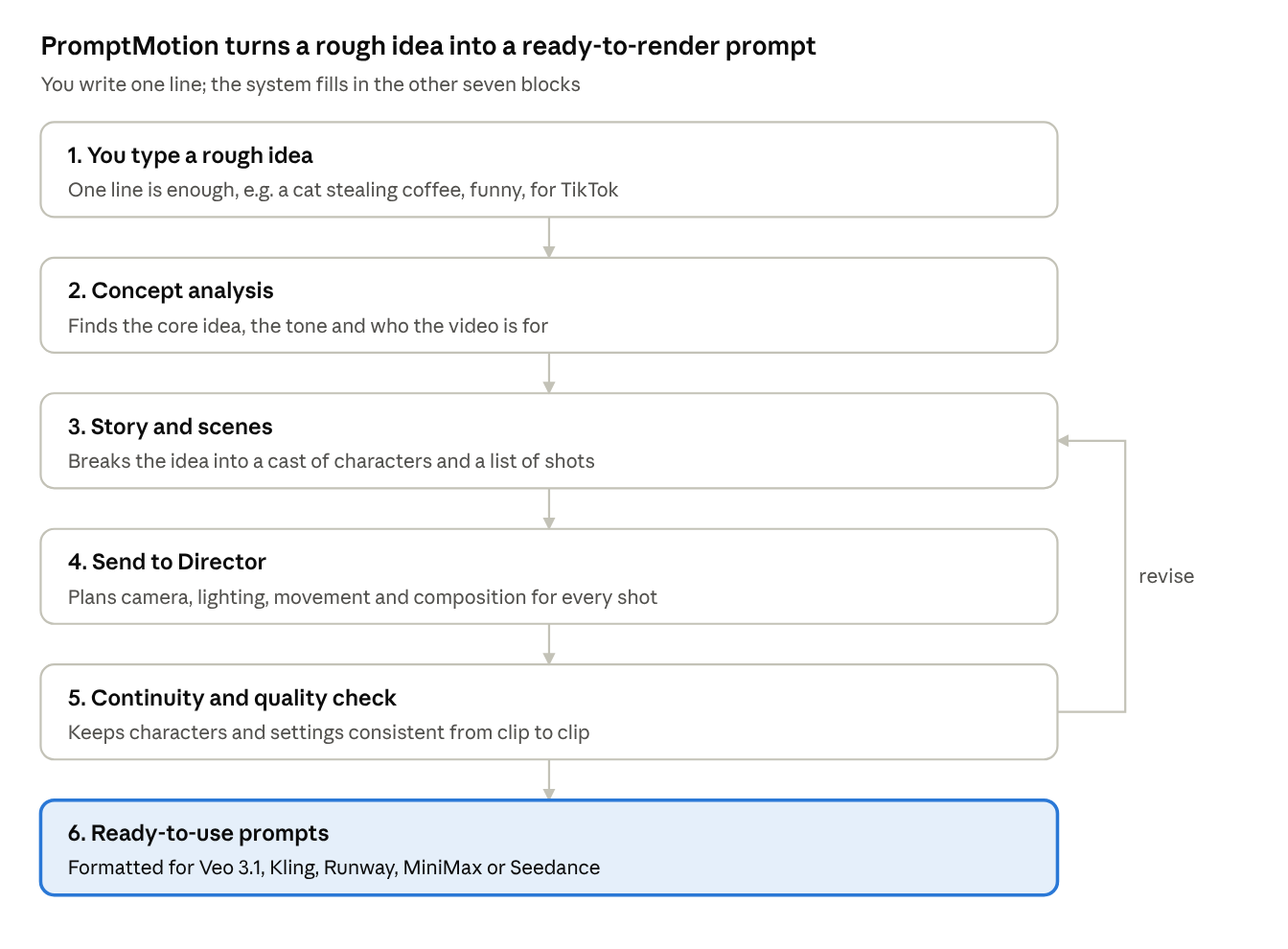
The step creators love most is Send to Director. Before writing a single word of the final prompt, the AI plans the camera, lighting, movement and composition, so every shot has real cinematic intent instead of random defaults.
Here's what that looks like in practice:
What you type:
funny video of a cat trying to steal my coffee
What PromptMotion gives you: a cast (your cat, described once and reused in every shot) plus a list of shots, each with its own structured prompt, ready to paste into your video tool. No blank page, no guessing which camera move fits.
Over 1,500 creators already use PromptMotion to plan their AI videos. Try it free at promptmotion.cc.
6 mistakes that ruin AI video prompts
- Cramming a whole story into one clip. "She wakes up, makes breakfast, drives to work and gets promoted" won't fit in 8 seconds. Split it into shots.
- Forgetting the camera. No camera direction means the model picks one, usually a slow, aimless drift.
- Describing emotions instead of visuals. "Feels nostalgic" means little. "Faded film colors, warm golden light" shows it.
- Contradicting yourself. "Bright sunny midnight" or "static camera, fast tracking shot" forces the model to pick one, often badly.
- Changing the character description between clips. If the hoodie is blue in clip one and navy in clip two, expect a different person.
- Too many subjects. Three people doing three different things usually ends in melted hands. Keep the focus tight.
Frequently asked questions
How long should an AI video prompt be?
Most good prompts land between 40 and 120 words. That's enough to cover all eight blocks without burying the important details.
Do the same prompts work in Veo, Kling and Runway?
The 8-block structure works across all of them, since every model needs the same basic information. Each tool has its own quirks, though, so small wording tweaks can help. PromptMotion adapts prompts for Veo 3.1, Kling, Runway, MiniMax and Seedance.
Should I write prompts as sentences or keyword lists?
Sentences, in most cases. Video models understand natural descriptions of action and sequence better than a pile of comma-separated tags.
How do I keep a character consistent across multiple clips?
Write one detailed character description and reuse it word-for-word in every prompt. Keep the setting and lighting consistent too, unless the scene is meant to change.
What's the single fastest way to improve my prompts?
Add a camera move. It's one line, and it instantly makes clips feel intentional.
Ready to stop guessing?
You now know what goes into a great AI video prompt. Eight blocks, one shot, visual words. Practice that and your results will jump.
And when you want to skip the blank page, try PromptMotion free. Type your rough idea, and get a structured, cinematic prompt ready for your favorite video model in seconds.

About the author
Yasiru Withanage — Founder | Head of AI & Computer Vision, Calexa Innovations Pvt Ltd
Yasiru Withanage is the Founder and Head of AI & Computer Vision at Calexa Innovations. With 6+ years in AI engineering, he builds production-ready systems across computer vision, generative AI, LLMs, and multi-agent systems. He also developed PromptMotion, an AI creative platform that helps creators turn ideas into cinematic video prompts.
Want prompts like these written for your own brief?
Paste your notes. PromptMotion writes the prompt.
Try it free