What Is AI Video Generation? A Complete Beginner's Guide
AI video generation creates video clips with artificial intelligence instead of a camera. Learn how it works, what it is good and bad at, the popular tools, and how to go from idea to finished clip.
 By Yasiru Withanage11 min read
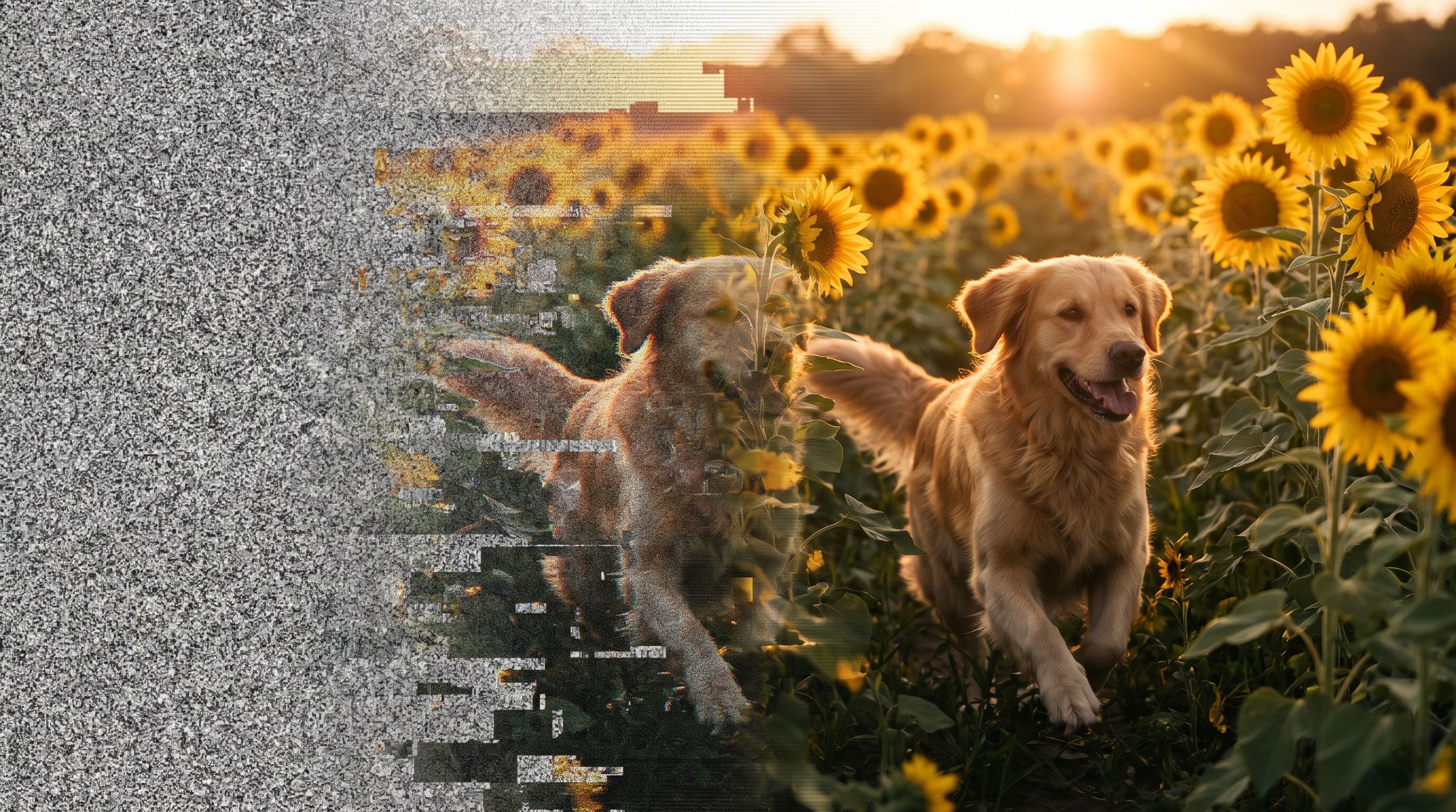
A couple of years ago, making a video meant a camera, lights, actors, and a lot of editing. Today you can type a sentence like "a golden retriever running through a sunflower field at sunset" and get a short, moving clip back in a few minutes.
That's AI video generation. And if you've been scrolling past these clips wondering how people actually make them, you're in the right place.
This guide walks you through it from zero. No jargon walls, no assumptions. By the end you'll know what AI video is, how it works under the hood (in plain English), what it's good and bad at, which tools people are using right now, and how to go from a rough idea to a finished clip.
What is AI video generation?
AI video generation is the process of creating video clips using artificial intelligence instead of a camera. You describe what you want, usually in words or with a reference image, and an AI model produces the footage for you.
Think of it like this. A traditional video is recorded. An AI video is imagined. The model has watched an enormous amount of video during training, so it has learned what things look like and how they move. When you ask it for "waves crashing on black rocks," it doesn't search a library for that clip. It builds a brand-new one, frame by frame, based on everything it has learned about waves, rocks, light, and motion.
Most AI video tools today produce short clips, typically somewhere between 5 and 20 seconds. Longer videos are usually made by generating several clips and stitching them together in an editor, the same way a film is made from many individual shots.
There are two main ways to start a generation:
- Text-to-video: you write a description and the AI creates the whole scene.
- Image-to-video: you give the AI a still image and it brings that image to life.
Let's look at each one.
How does text-to-video work?
Text-to-video is the one most people picture when they hear "AI video." You type a prompt, hit generate, and get a clip.
Here's what happens behind the scenes, simplified:
- The AI reads your prompt. A language component breaks your sentence down into meaning: the subject (a cat), the action (jumping), the setting (a kitchen counter), the mood (warm morning light), and any style hints (cinematic, cartoon, handheld).
- It starts from noise. Most modern video models are diffusion models. They begin with what is basically TV static, a random mess of pixels across every frame.
- It removes the noise step by step. Guided by your prompt, the model slowly cleans up that static, nudging it closer and closer to something that matches your description. After many small steps, shapes become objects, objects get detail, and the frames line up into smooth motion.
- It keeps the frames consistent. This is the hard part. The model has to make sure the cat in frame 1 is the same cat in frame 120, and that it moves in a believable way. Newer models handle this far better than early ones did.
- You get your clip. Some models now also generate matching sound, like footsteps, ambient noise, or even dialogue.
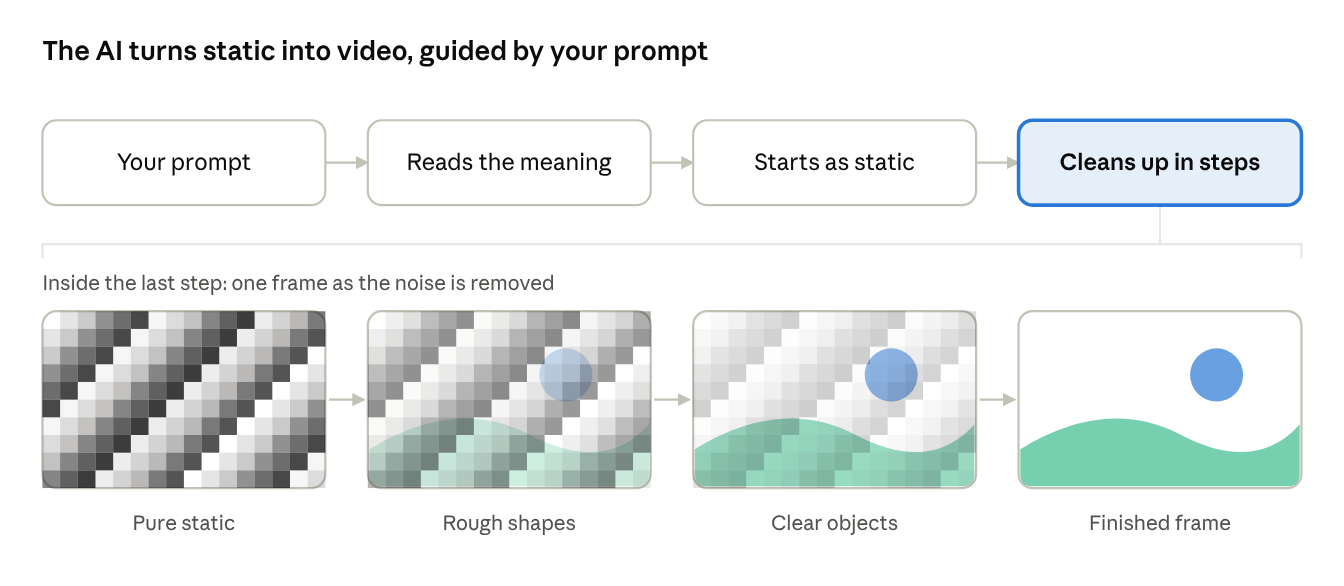
Every frame starts as noise. Your prompt steers each clean-up step until a sunset over the hills appears.
The big takeaway: the AI only knows what you tell it. A vague prompt like "a cool car video" leaves the model guessing about almost everything. A detailed prompt that describes the car, the road, the time of day, the camera angle, and the movement gives it a clear target. That's why prompt writing has become a skill of its own.
Image-to-video explained
Image-to-video starts from a picture instead of a blank slate. You upload a still image, add a short prompt describing what should happen, and the AI animates it.
For example, you could upload a product photo of a sneaker and write "slow 360-degree rotation, soft studio lighting." Or take a portrait and ask for "she turns her head and smiles, hair moving gently in the wind."
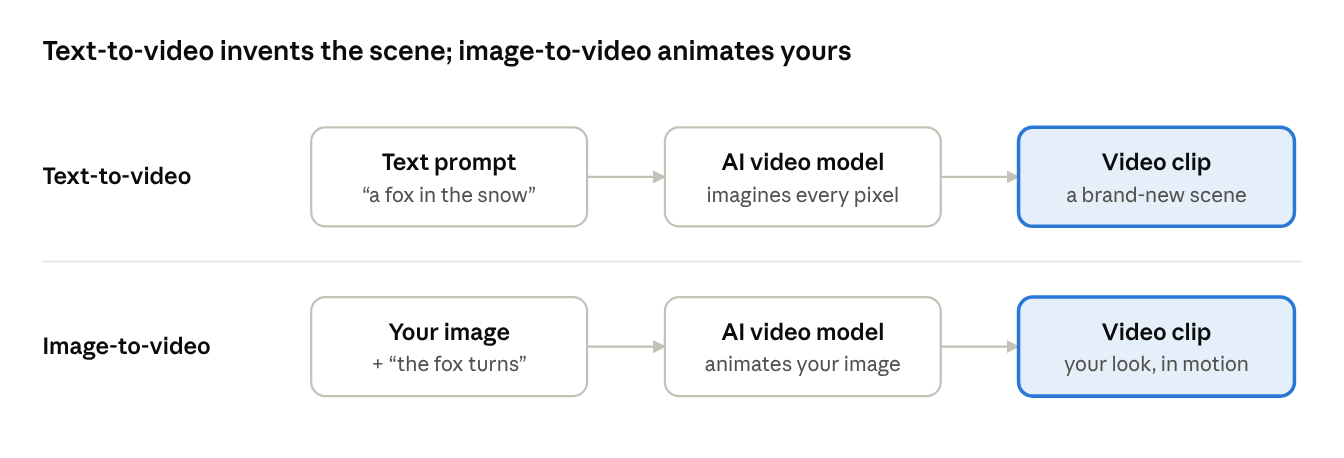
Same model, different starting point: words alone, or a picture you already like.
Why people love image-to-video:
- More control over the look. The first frame is exactly what you chose, so colors, characters, and composition stay on target.
- Consistent characters. If you're making a series with the same character, starting each clip from an image of that character keeps them looking the same across episodes.
- It works with images you already have. Product shots, illustrations, AI-generated art, even old family photos can become motion.
Many creators combine both methods. They generate a perfect still image first (with an AI image tool), then feed it into an image-to-video model. This gives them the best of both worlds: precise visuals plus natural motion.
Some tools also support start and end frames, where you give the AI two images and it figures out the motion in between. That's handy for transitions and transformations.
How AI creates motion, camera movement, and scenes
A still image only has to look right. A video has to move right. That's what makes AI video so much harder than AI images, and it's worth understanding how models deal with it.
Motion
During training, the model sees millions of clips of things moving: people walking, water flowing, leaves blowing, cars turning. It learns patterns, like the way a person's arms swing when they walk or how smoke drifts upward. When you ask for "a man jogging along a beach," it uses those learned patterns to predict how each frame should change from the last.
This is also where most errors come from. Fast or complex actions (dancing, fighting, juggling) and hands are still tricky, so you'll sometimes see extra fingers, limbs that bend oddly, or objects that melt into each other.
Camera movement
Here's something beginners often miss: the AI can act like a camera operator. If you describe the camera, it will try to follow your direction. Common moves that most models understand include:
- Static shot: the camera stays still and the subject moves.
- Pan: the camera turns left or right.
- Tilt: the camera tilts up or down.
- Dolly in / dolly out: the camera physically moves closer or further away.
- Tracking shot: the camera follows a moving subject.
- Drone or aerial shot: a high, sweeping view from above.
- Handheld: slight natural shake for a raw, documentary feel.
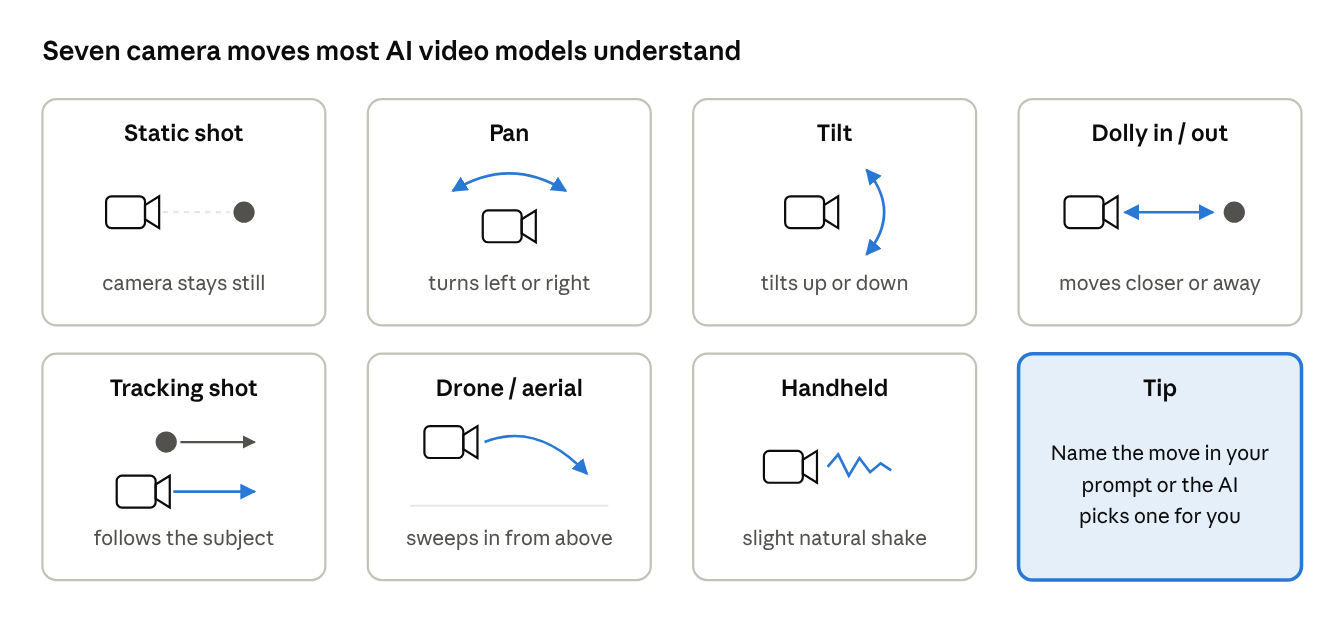
If you leave the camera out of your prompt, the model picks one for you, and it may not be what you had in mind.
Scenes
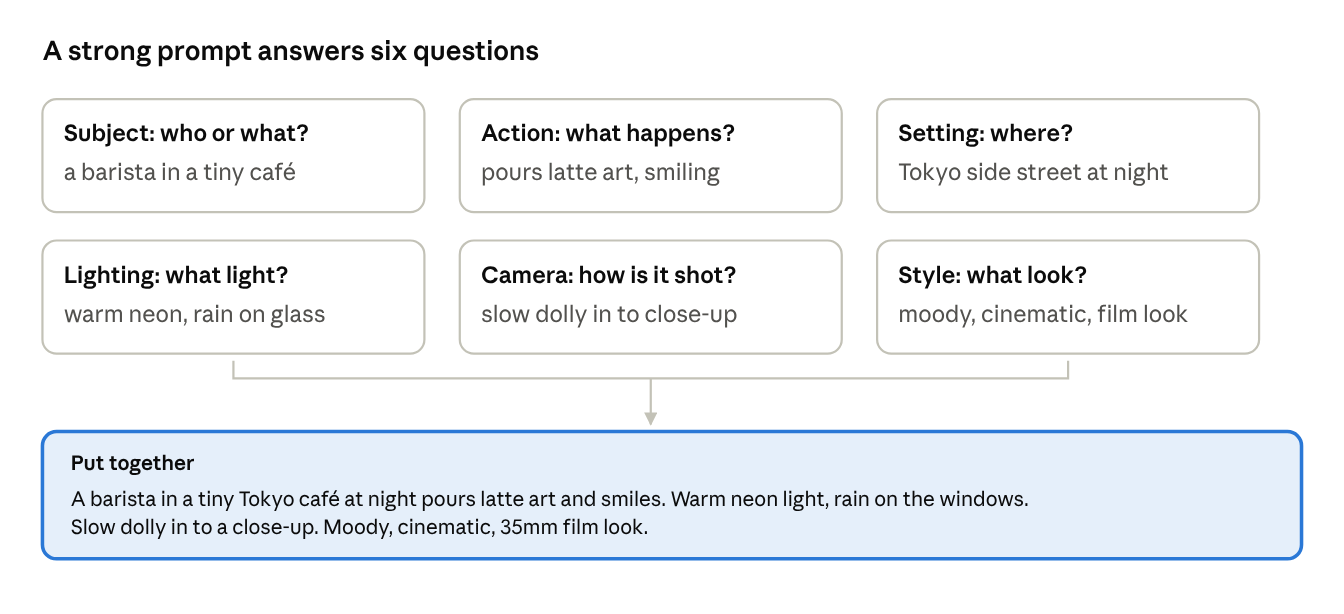
A scene is everything around the action: the location, lighting, weather, time of day, and overall style. The AI builds all of this from your description. "A café" gives you a generic café. "A tiny Tokyo café at night, rain on the windows, warm neon reflections, moody cinematic look" gives you a scene with a real atmosphere.
The more you treat your prompt like a mini film brief (subject, action, setting, lighting, camera, style), the better your results get.
The AI video workflow: idea → prompt → generation → editing
Good AI videos rarely come from one lucky click. Most creators follow a simple four-step loop.
- Idea. Start with what you want to make and why. A product teaser? A funny short for TikTok? A moody music visual? Write down the story in one or two sentences, and if it's more than one shot, list the shots you need.
- Prompt. Turn each shot into a clear, detailed prompt. Describe the subject, what they're doing, where it happens, the lighting, the camera movement, and the style. This is the step that makes or breaks the result, and it's where most beginners struggle.
- Generation. Run the prompt through your chosen AI video model. Expect to generate a few versions of each shot. Even with a great prompt, AI output varies, so pick the best take and tweak the prompt for the ones that missed.
- Editing. Bring your best clips into an editor (CapCut, Premiere Pro, DaVinci Resolve, or anything you like). Trim them, put them in order, add music, voiceover, captions, and transitions. This is where separate clips become an actual video.
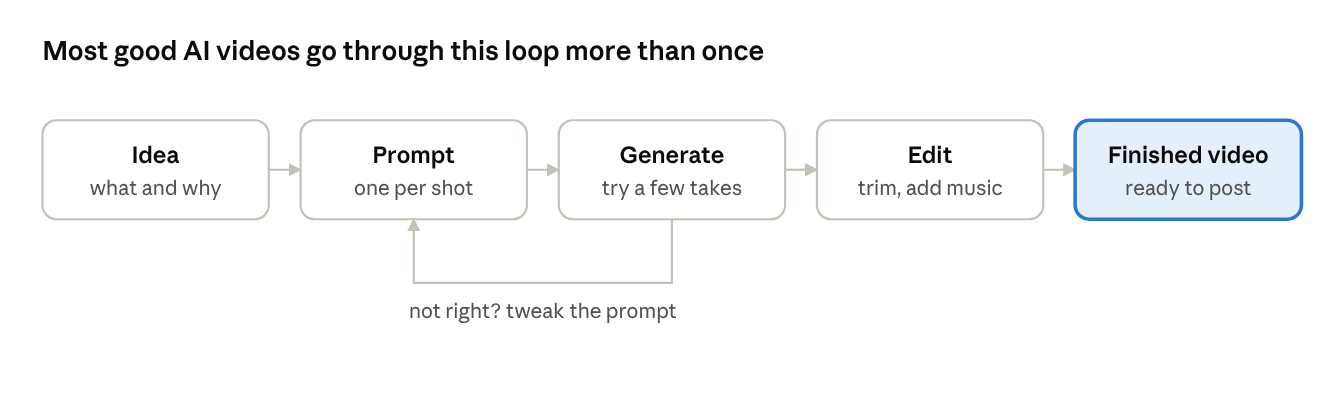
Then repeat. Each round teaches you a little more about how the models respond to your words, and your prompts get sharper.
Benefits and limitations of AI video
AI video is powerful, but it isn't magic. Knowing both sides saves you a lot of frustration.
The benefits
- Speed. A shot that would take a day to plan and film can be generated in minutes.
- Low cost. No crew, no location fees, no equipment. For small businesses and solo creators, this is huge.
- Anything is possible. Dragons, underwater cities, a capybara eating a chili pepper. If you can describe it, you can try it.
- Fast testing. You can try five different versions of an ad concept before spending real money on any of them.
- No technical background needed. If you can write a clear sentence, you can start.
The limitations
- Short clips. Most generations are only a few seconds long, so longer videos need planning and editing.
- Consistency is hard. Keeping the same character, outfit, or location across multiple clips takes effort (image-to-video helps a lot here).
- Weird details. Hands, text on signs, fast action, and crowds can still come out strange.
- Trial and error. You'll often need several generations to get one you love, and on paid tools that uses up credits.
- Prompting has a learning curve. The difference between an average result and a great one is usually the prompt.
- Ethics and rules. Most platforms block realistic videos of real people, and you should always be honest when content is AI-generated, especially in ads or news-like content.
Popular AI video models in 2026
New models come out every few months, so the "best" one keeps changing. Here are the names you'll hear most right now and what each is known for.
| Model | Made by | Known for |
|---|---|---|
| Veo 3.1 | Google DeepMind | Cinematic, realistic footage with built-in audio |
| Kling 3.0 | Kuaishou | Realistic human motion and multi-shot sequences with camera cuts |
| Seedance 2.0 | ByteDance | Strong all-rounder for ads and music videos, top of public quality rankings |
| Runway Gen-4.5 | Runway | Fine creative control, popular with filmmakers and brands |
| Hailuo | MiniMax | Good quality at a lower cost |
| Luma Ray3 | Luma AI | Smooth image-to-video |
| Wan 2.7 | Alibaba | Free, open-source model you can run yourself |
Popular AI video models in 2026, who makes them and what each is known for
There's no single winner. Many creators use two or three models: one for realistic hero shots, another for fast or cheap drafts, and an image-to-video tool for consistent characters. The good news is that the core skill, writing a clear prompt, works across all of them.
Where PromptMotion fits into the workflow
Remember step 2, the prompt? That's the step where most people get stuck. You know what you want to see, but turning it into a prompt the AI actually understands, with the right camera moves, lighting, and scene detail, feels like learning a new language.
That's exactly the gap PromptMotion was built to fill.
You give PromptMotion your rough idea, even something as loose as "funny video of a capybara trying spicy food," and it turns it into structured, ready-to-use prompts for tools like Veo 3.1, Kling, Runway, MiniMax, and Seedance. Instead of one vague prompt, you get a planned set of shots that work together.
Here's what it handles for you:
- From idea to story. It shapes your rough concept into a short story with a clear beginning, middle, and end, then breaks it into individual shots.
- Director-level planning. With the Send to Director feature, PromptMotion plans the camera angle, lighting, movement, and composition for each shot before writing the final prompt, so you don't need to know film terms.
- Consistency across clips. It keeps track of your characters, outfits, and settings from shot to shot, which is one of the hardest parts of AI video.
- Model-ready output. Copy the prompts straight into your favorite video model and generate.
In the workflow, it sits right between your idea and the generation step:
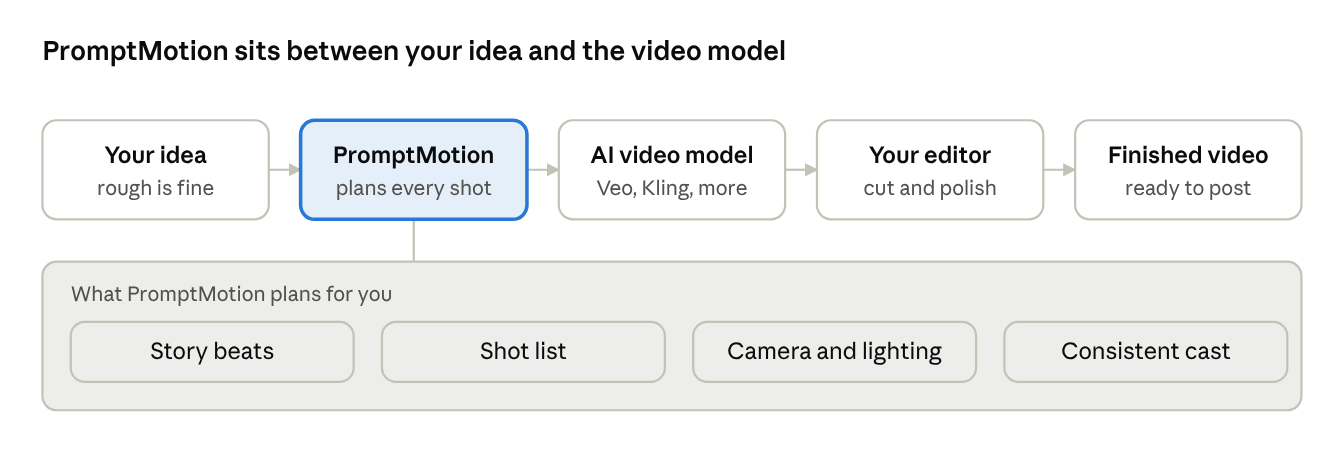
It doesn't replace the video models. It makes them work much better for you. And there's a free plan, so you can try it on your next idea without paying anything.
Frequently asked questions
Is AI video generation difficult for beginners?
Not really. Getting a video is easy: type a sentence and press generate. Getting a good video takes a bit of practice, mostly in learning how to write prompts that describe the subject, action, setting, lighting, and camera. Tools like PromptMotion shorten that learning curve by writing the detailed prompt for you.
Is AI video generation free?
Partly. Most AI video tools offer a free tier or free credits to try them out, but generating a lot of videos, especially in high resolution or with audio, usually needs a paid plan because video generation is expensive to run. Open-source models like Wan can be used for free if you have a powerful computer or a cloud GPU.
Can AI create realistic videos?
Yes, and it's getting harder to tell the difference. Top models can now produce footage that looks like it was filmed with a real camera, sometimes with matching sound. They still slip up on hands, fast action, and on-screen text, so realistic results often take a few attempts. And for ethical reasons, most platforms won't let you create realistic videos of real people.
How long can an AI-generated video be?
Most models generate clips between about 5 and 20 seconds at a time. To make a longer video, you generate several clips and join them in an editor.
Do I need video editing skills?
Basic skills help, but you don't need to be a pro. Free apps like CapCut are enough to trim clips, add music, and put captions on your video.
Ready to make your first AI video?
AI video generation has gone from a fun experiment to a real creative tool in a very short time. You don't need a camera, a crew, or a film degree. You need an idea and a clear way to describe it.
If you take one thing from this guide, let it be this: your prompt is your director's notes. The better you describe the shot, the better the AI delivers.
Got an idea but not sure how to turn it into a prompt? Try PromptMotion free and turn your rough idea into ready-to-generate video prompts in seconds.
Model information as of October 2026. Sources: VideoGen, Kingy AI, FlowHunt, ChatCut.

About the author
Yasiru Withanage — Founder | Head of AI & Computer Vision, Calexa Innovations Pvt Ltd
Yasiru Withanage is the Founder and Head of AI & Computer Vision at Calexa Innovations. With 6+ years in AI engineering, he builds production-ready systems across computer vision, generative AI, LLMs, and multi-agent systems. He also developed PromptMotion, an AI creative platform that helps creators turn ideas into cinematic video prompts.
Want prompts like these written for your own brief?
Paste your notes. PromptMotion writes the prompt.
Try it free